Search Tips
The top banner of this online manual provides an extensive search function similar to Internet search engines like Google and Bing.
 Search Features
- Searches are not case-sensitive.
- A search will return partial matches.
-
To search for a specific phrase, enclose the search terms in quotation marks. For example, a search on
"student teacher"returns only the topics in which that two-word phrase appears. - When you enter multiple topics, the search returns only the topics that contain all of the terms. (This is known as a Boolean AND search.)
- You can include Boolean operators with the search terms to perform advanced searches that include or exclude some topics based on the search terms.
Search Filter
Click the filter icon in the search bar to narrow the search to a specific area. For example, if you select Library User, only the topics concerning general MEDIAL library operations are searched for the terms you specify. Administration and installation topics are excluded.

Results Page
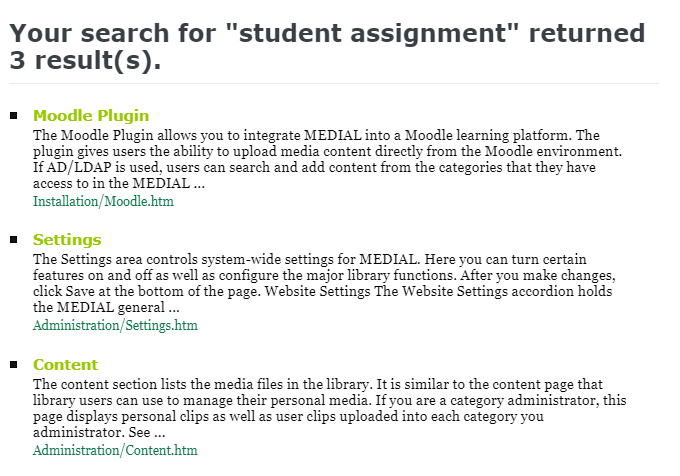
The search results page provides hypertext links to the topics that contain the search terms. The results are weighted, meaning that the topics at the top of the search results page contain more prominent instances of the search terms.
Highlight Colors
When you display a topic, the search terms are highlighted. When you search on multiple terms, each matched term uses a different highlight color.
- Term 1
- Term 2
- Term 3
- Term 4
Removing Highlight Colors
To remove the highlight colors from the page, click the highlight removal button on the toolbar:

Advanced Searches (Boolean Operators)
When you run a search on more than one term, you can use Boolean operators to refine the results.
Find Topics that Contain All of the Search Terms (Boolean AND)
By default, a search returns only the topics that contain all of the search terms. For example, the following search terms return only the pages that contain both "student" and "teacher":
student teacher
Adding the Boolean AND Operator in Complex Searches
When you perform a complex search, you can use any of these following operators to specify a Boolean AND search:
- AND (not case-sensitive)
- +
- &
Examples of Boolean AND Searches
For example, all of these searches are equivalent:
student teacherstudent and teacherstudent AND teacherstudent & teacherstudent + teacher
Find Topics that Contain Some or All of the Search Terms (Boolean OR)
A Boolean OR search returns all topics that contain some or all of the terms. You can use either of these operators:
- OR (not case-sensitive)
- |
For example, all of the following searches return the topics that contain the term "student," the term "teacher," or both:
student or teacherstudent OR teacherstudent | teacher
Exclude Topics that Contain Some of the Search Terms (Boolean NOT)
A Boolean NOT search excludes topics that contain one or more of the terms. You can use any of these operators:
- NOT (not case-sensitive)
- !
- ^
For example, all of the following searches return the topics that contain the term "student" but do not include the term "teacher":
student not teacherstudent NOT teacherstudent ! teacherstudent ^ teacher
Specify Complex Search Criteria (Expression Parentheses)
Use parentheses to combine Boolean phrases and search terms. The following table lists a few examples.
| Search Expression | Results Returned |
|---|---|
| student AND (teacher OR assignment) | Topics that contain "student" as well as either "teacher" or "assignment." |
| student OR (teacher NOT assignment) | Topics that contain "student" or "teacher." Topics that contain both "teacher" and "assignment" are excluded, however. |
| student OR (teacher AND assignment) | Topics that contain "student" or that contain both the terms "teacher" and "assignment." |

|
©2025 Streaming Ltd |   |